Design the desk that fits your space
Standing desks, L-shaped workstations, writing desks — describe yours in plain language, then adjust width, height, drawers, and cable management with sliders or a sentence.
New signups and free trials are temporarily paused
Brief → plan → model
Describe the object, dimensions, materials, and constraints. The agent turns the brief into editable CAD.
Select → ask → refine
Select the part you mean, ask for a change, and let the agent inspect the updated model.
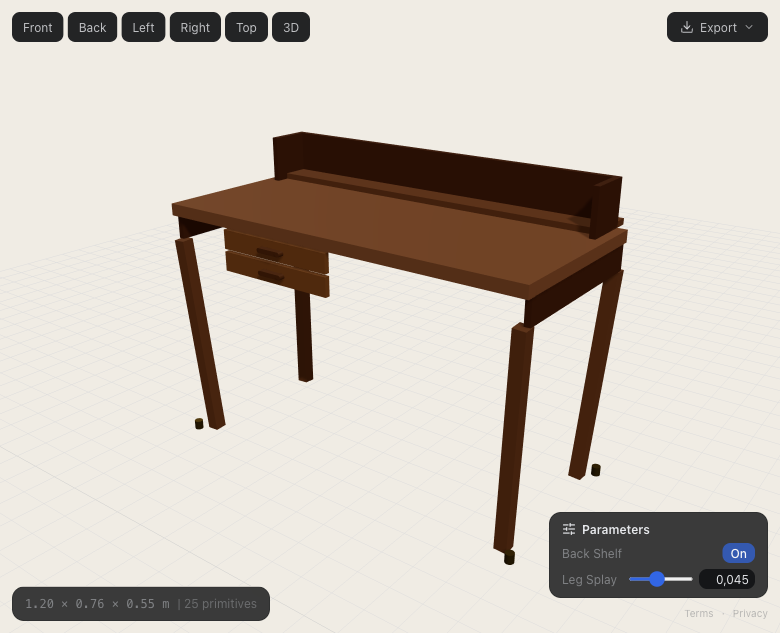
Generated with Prompt2CAD — brief the agent, refine the model, export the CAD.
Design the desk that perfectly fits your space and workflow. Tell Prompt2CAD what you need — a standing desk with cable management, an L-shaped corner workstation, a compact writing desk with drawers, or a shared double desk — and the AI creates a detailed parametric 3D model. Every dimension is adjustable: width, depth, height, leg style, drawer count, cable tray position. When you're happy with the design, export to STEP or DXF for your CAD workflow, or STL for 3D printing miniatures and prototypes.
From a brief or existing model to editable CAD
No CAD experience needed. The agent handles the modeling loop while you control the object, dimensions, and final export.
Brief the agent or open a model
Describe the object, upload a reference image, or open an existing DWG, DXF, SKP, OBJ, STL, or GLB model and continue designing from it.
The agent plans and builds
The agent asks for missing details when needed, plans the structure, and uses CAD tools to create real parametric geometry at the dimensions you specified.
Inspect and refine
The agent renders and checks its work from multiple angles. Use controls or say "make it wider" or "add a back panel" to refine the same model.
Present or hand off
Review the geometry-derived parts list, download it as CSV, or export STEP, DXF, OBJ, STL, or GLB for downstream CAD, prototyping, and production preparation.
How the CAD agent helps
Any desk configuration
Standing desks, sit-stand desks, L-shaped, U-shaped, floating wall desks, trestle desks, or classic writing desks. Describe your setup and the AI builds it.
Cable management & accessories
Add cable trays, grommet holes, monitor arm mounts, keyboard trays, and under-desk storage. The AI integrates accessories into the structural design.
Ergonomic dimensions
The AI knows standard desk heights, keyboard tray positions, and monitor distances. Get ergonomically correct designs out of the box.
Material exploration
Try different materials and finishes — oak, walnut, white laminate, steel frame, plywood. See how each looks in the 3D preview before committing.
Built for makers and engineers
From DIY builders and product designers to mechanical engineers, people are using Prompt2CAD to design and iterate on real projects.
"I spent weeks trying other AI and modeling tools for built-in storage in oddly shaped rooms. Prompt2CAD was the first that gave me a precise design I could verify and build from, without needing a CAD background."
DIY home renovator, United States
"I designed a custom L-shaped walk-in closet, 240 by 140 cm, with oak panels, hanging sections, drawers, and recessed lighting. I described the layout in detail and refined the proportions as I went. Saved me a long session in modeling software."
Furniture designer, East Asia
"I needed a custom planter for a terrace with an unusual stepped floor, so the base had to follow an L-shape. I described the geometry, refined a few details, and walked away with something I could actually build from. Much faster than starting from scratch in CAD."
DIY builder, Italy
Brief the CAD agent
Include dimensions, constraints, materials, and intended use when you know them.
Parts list and CAD exports
Review a geometry-derived list of part IDs, dimensions, quantities, and materials, download it as CSV, or export the model for downstream CAD and prototyping. Verify production details before fabrication.
Simple, transparent pricing
Start free. Top up when you need more.
Free
No credit card required
Includes new signups and free trials are temporarily paused, so you can create your first CAD model. AI chat is charged by actual token usage.
- New signups and free trials are temporarily paused
- Free PNG viewport exports
- Photorealistic AI renders (50 credits each)
- Unlimited projects
- Full AI chat & parametric controls
- Developer API access (beta)
- API CAD downloads during the trial
Pay as you go
Top up whenever you need
Includes 1,000 credits — 7–24 new CAD models or 35–125 model updates in the illustrative examples below.
- Everything in Free
- Web-app STEP, DXF, 3MF, GLB, DAE, OBJ & STL exports unlocked
- Shared app & API credit balance
- Full parts list & CSV cut-list export
- Printable PDF drawings
- Chat charged by actual tokens, with discounted cache hits
- Priority AI model access
DeepSeek V4.1 Flash 1017 token rates: $1.20 input / $0.024 cached input / $4.80 output per million tokens. Output includes reasoning. Cache pricing applies only to provider-reported cache hits. Each successful non-zero-token call rounds up to whole credits, with a one-credit minimum.
Illustrative DeepSeek 1017 usage, not measured averages: a new model uses 10 calls of 100k input and 3k output tokens each; an update uses 2 calls of 100k input and 4k output each. Ranges compare 90% input cache hits with no cache hits; the first new-model call is uncached. Output includes reasoning. Actual usage can fall outside these ranges; renders and other AI tools cost extra. Pack counts are either-or examples, not combined allowances or guaranteed completed designs.
Integrating through the API? Generation uses the same account credits and token-based billing. API CAD downloads are unlocked during the trial; web-app CAD downloads unlock after a top-up.
See API access, pricing, and examples →Ready to model your custom build?
Describe your build, refine the dimensions with the agent, and export it to your workflow.
No CAD experience needed · New signups and free trials are temporarily paused.